Why Some Thai Words Are Harder to Type: Finger Path Matters More Than Word Length
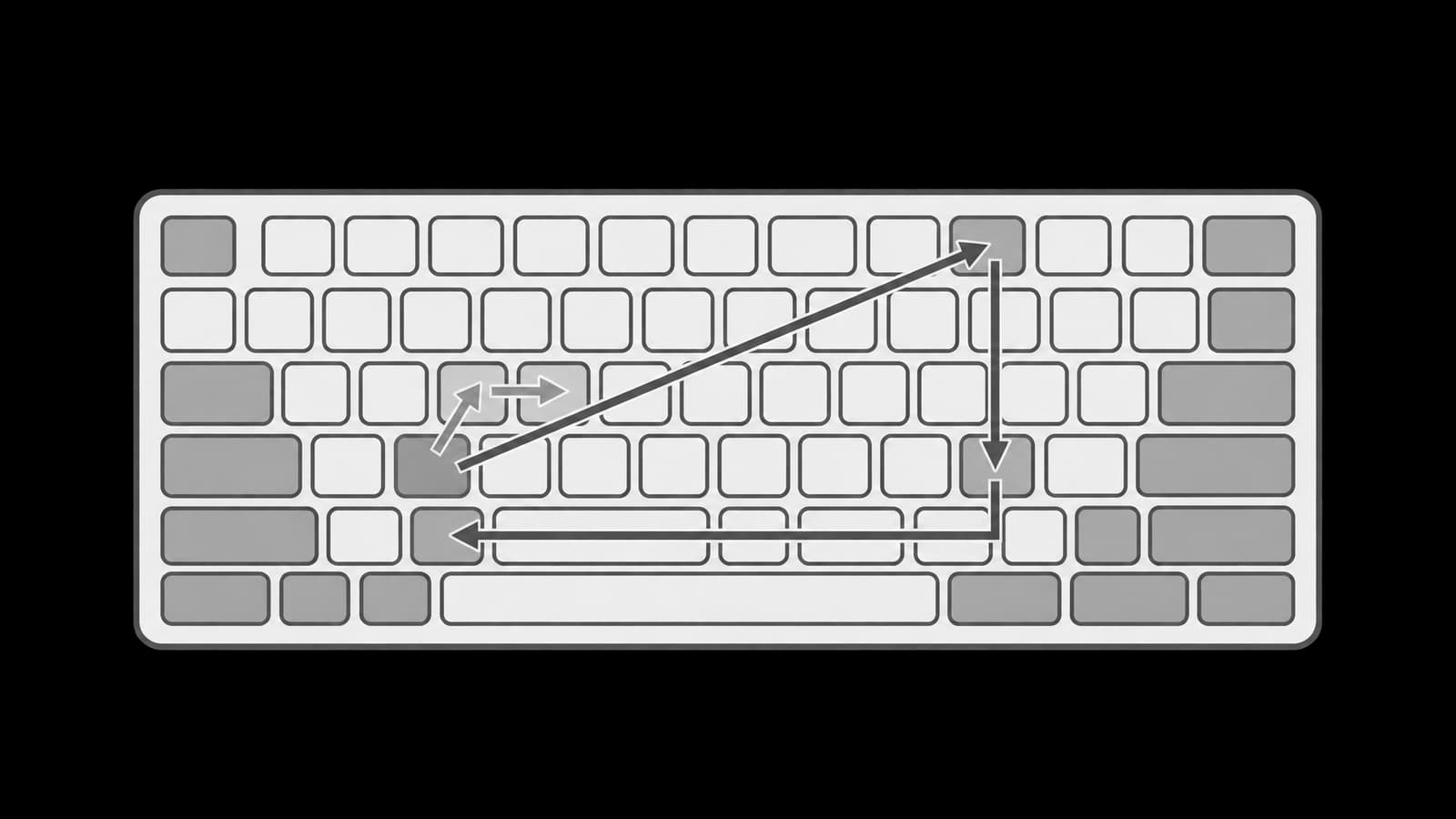
Some Thai words look short but feel awkward to type. Other words look longer but come out smoothly. Beginners often assume that word length is the main reason: a two-character word should be easy, a four-character word should be harder, and a long word should be hardest. That assumption is useful only at the very beginning. In real touch typing, difficulty comes from the finger path: which fingers move, which rows they visit, whether the hands alternate, whether the typist must change direction, and whether the spelling order differs from the visual habit of reading.
This article focuses on Thai typing difficulty through near-identical words, especially ไม่ and ใหม่. Both are common, both are short, and both contain a pre-posed vowel and a tone mark. Yet the finger paths are not the same. The lesson is not that one word is objectively difficult for every typist forever. The lesson is that a word becomes slower when its path asks the hands to do more work than the eyes expect.
Difficulty is a finger-path problem
A word on the screen is a visual object. A word on the keyboard is a movement sequence. These two views are related, but they are not identical. When a learner sees a short Thai word, the mind may classify it as easy. The hands, however, must perform the actual route: press the first character, move to the second, coordinate the third, add a tone mark if needed, and recover back to a comfortable position.
Four factors usually explain why one Thai word feels harder than another. The first is keystroke count: more characters usually mean more chances to hesitate. The second is hand alternation: a path that lets the left and right hands take turns can feel different from a path that overloads one side. The third is row movement: moving between rows can be more demanding than staying near the home row. The fourth is spelling order: pre-posed vowels are typed before the consonant, so the first key pressed may be a vowel that appears before the consonant visually.
- Keystroke count: how many key presses the word requires.
- Hand alternation: whether the word naturally moves between left and right hands.
- Row jumps: whether the fingers must leave the home row and return.
- Layer changes: whether Shift is needed for any character.
- Order awareness: whether the typed order matches the learner’s mental spelling rhythm.
Case study: ไม่ and ใหม่
The clearest example is the contrast between ไม่ and ใหม่. They are visually close and semantically familiar, but their typing paths differ. ไม่ has three keystrokes, all on the base layer: ไ on the w key with the left ring finger, then ม on the comma key with the right middle finger, then the tone mark ่ on the home row with the right index finger. The path begins on the left hand, moves to the right hand, then stays on the right side for the tone mark.
ใหม่ has four keystrokes, also on the base layer: ใ on the period key with the right ring finger, then ห on the home row with the left ring finger, then ม on the comma key with the right middle finger, then the tone mark ่ on the home row with the right index finger. The extra ห is a silent leading consonant, or อักษรนำ, in the written word. For typing, silent does not mean invisible to the hands. The finger must still press it.
- ไม่: ไ → ม → ่.
- ไ: w key, left ring finger.
- ม: comma key, right middle finger.
- ่: home row, right index finger.
- ใหม่: ใ → ห → ม → ่.
- ใ: period key, right ring finger.
- ห: home row, left ring finger.
- ม: comma key, right middle finger.
- ่: home row, right index finger.
The difference is not merely one extra character. ใหม่ begins with the right hand on ใ, crosses to the left hand for ห, returns to the right hand for ม, then stays on the right index for the tone mark. That path asks for more alternation and more planning. ไม่ begins with ไ on the left hand and then moves to the right side for the rest. Both words are short, but ใหม่ contains a more complex route.
Why ไม่ can feel easier than ใหม่
ไม่ can feel easier because the movement is compact after the first keystroke. Once the left ring finger presses ไ, the rest of the word is handled on the right side: ม and the tone mark ่. The typist can think of it as a simple left-to-right handoff followed by a right-hand finish. It is still necessary to type the pre-posed vowel before the consonant, but the path is short and predictable.
ใหม่ can feel slower because the path changes direction more. It starts on the right ring finger with ใ, crosses to the left ring finger for ห, crosses back to the right middle finger for ม, and finishes with the right index finger for ่. The word is still short, and all characters are on the base layer, but the path asks the typist to coordinate both hands more carefully.
The silent leading ห is the key lesson. In reading, a silent or non-pronounced consonant may feel light. In typing, it is a full movement. The hands do not care whether the consonant is pronounced strongly. They care whether it must be pressed. Therefore, words with อักษรนำ may feel harder than their visual length suggests.
- ไม่ has three keystrokes; ใหม่ has four.
- ไม่ moves from left hand to right hand and then finishes on the right.
- ใหม่ starts on the right, crosses left, then returns right.
- ใหม่ contains a silent leading ห that still requires a real key press.
- Both are base-layer words, so the difference is path complexity rather than Shift use.
Near-identical words can hide extra work
The same principle appears in many Thai word pairs. A word may look like a small variation of another word, but the keyboard route may change meaningfully. Sometimes the difference is an added consonant. Sometimes it is a tone mark. Sometimes it is a pre-posed vowel. Sometimes it is a repeated movement that forces the same hand to work twice in a row.
Consider มา and มาก. The second word adds one final consonant. Visually, this is a small addition, but for the fingers it creates another handoff after the vowel. The typist must not stop at the familiar มา pattern; the path must continue. The difficulty is not that มาก is long. It is that the finger path extends beyond a chunk the learner may already know.
Consider ไป and ไม่. Both are short and begin with a pre-posed vowel. Yet ไม่ adds a tone mark and uses a different internal route. The learner who types ไป smoothly may still pause on ไม่ because the tone mark must be included as part of the word. Tone marks are not decorative for the typist; they are keystrokes that must be placed reliably.
Consider เป็น and เปลี่ยน. Both begin with a pre-posed vowel, but เปลี่ยน contains a longer internal structure. It requires the typist to keep the beginning order under control while continuing through more consonants and vowel components. The word may be familiar to read, but the hand path is longer and more varied. This is why learners should practise difficult-looking sections rather than only complete words.
- มา → มาก: the familiar chunk gains an extra ending movement.
- ไป → ไม่: a short pre-posed-vowel word gains a tone-mark requirement.
- เป็น → เปลี่ยน: a familiar beginning expands into a longer path.
- ใด → ใหม่: both start with a pre-posed-vowel habit, but ใหม่ adds the silent leading ห and a tone mark.
- คำ → ความ: a short word expands into a formal-looking chunk with more internal movement.
Keystroke count is only the first layer
Counting keystrokes is useful, but it does not explain everything. A four-keystroke word may feel easier than a three-keystroke word if the four movements are familiar and balanced. A short word may feel hard if it begins far from where the fingers expect, if it changes hands awkwardly, or if the learner repeatedly forgets a mark.
For ไม่ and ใหม่, keystroke count does explain part of the difference: ไม่ has three presses, while ใหม่ has four. But the stronger explanation is the shape of the path. ใหม่ starts on the right hand, crosses to the left, returns to the right, and ends with a right-index tone mark. It is a short word with a zigzag route.
A learner should therefore analyze hard words in layers. First ask how many keystrokes the word requires. Then ask which hand starts. Then ask whether the next press uses the same hand or the other hand. Then ask whether a tone mark or Shift-layer character appears. Finally, ask whether the typed order matches the way the learner says the word mentally.
- Count the keystrokes.
- Name the starting hand.
- Trace left-hand and right-hand alternation.
- Notice row changes and returns to the home row.
- Mark any tone mark or Shift-layer character.
- Check whether spelling order creates hesitation.
Row jumps and recovery time
The home row is comfortable because the fingers begin there and return there. A word becomes more demanding when it sends the fingers away from that stable position and then asks them to recover quickly. In ไม่, the first press is on the top row, then the path moves to the right-hand area and finishes with the right index on the home row. In ใหม่, the first press is on the period key, then the word crosses to a home-row consonant, then to the comma key, then to the home-row tone mark.
The important idea is recovery. A row jump is not only the outward movement. It is also the return to a useful typing position. If a finger leaves its home position and the next key is also unfamiliar, the learner may pause. This pause is often misread as “I do not know the word.” More precisely, the finger path has not yet become automatic.
Row-jump practice should be short. Practise only the difficult transition, not the whole sentence. For example, if ใหม่ feels slow, do not repeat a long sentence containing ใหม่ from the beginning every time. Isolate ใ → ห, then ห → ม, then ม → ่. After those transitions feel clean, rejoin them as ใหม่. Finally place the word inside a phrase.
- If the first movement is slow, drill only the first two keystrokes.
- If the middle movement breaks rhythm, drill the middle handoff.
- If the tone mark is missed, drill the final consonant-to-tone transition.
- If the word is correct alone but wrong in a sentence, practise phrase insertion.
- If the hands feel tense, slow down and reset before repeating.
Pre-posed vowels change the starting point
Pre-posed vowels matter in this article only because they change the first movement of the word. In words such as ไม่ and ใหม่, the first key pressed is the pre-posed vowel, not the consonant that the learner may think of as the spoken center of the word. This is ordinary Thai typing order, but it can still create hesitation if the learner mentally starts from the consonant.
In ไม่, the typist begins with ไ. In ใหม่, the typist begins with ใ. This difference matters because the first movement sets the whole path. If the learner begins by thinking about ม in ไม่, the word may stall before it starts. If the learner begins ใหม่ by thinking about the visible or pronounced core only, the silent leading ห may be forgotten. The drill should therefore begin from the actual first keystroke.
A useful habit is to say the keystroke order silently while practising a hard word. For ไม่, think ไ → ม → ่. For ใหม่, think ใ → ห → ม → ่. This is not meant to be permanent self-talk. It is a temporary bridge. Once the path becomes familiar, the hands should no longer need a verbal instruction.
How to drill harder paths
The best way to drill a hard Thai word is to break it into transitions. Do not repeat the full word quickly while making the same mistake. Find the exact handoff that causes hesitation. Then practise that handoff slowly until the movement feels predictable. After that, rebuild the word and place it back into normal text.
- Trace the word as a sequence of keystrokes.
- Circle the point where the fingers pause.
- Practise the two-key transition around that pause.
- Add one character before or after the transition.
- Rebuild the full word.
- Type the word in a short phrase.
- Type the phrase in a sentence.
- Return to the small transition if the error comes back.
For ไม่, a simple drill is ไ ม ่, then ไม่, then ไม่ได้, then ฉันไม่ได้. For ใหม่, use ใ ห, then ห ม, then ม ่, then ใหม่, then ของใหม่, then เริ่มใหม่. The purpose is not to force speed. The purpose is to let the fingers learn the route without panic. The learner should feel the path become less surprising.
This same method works for any word that feels harder than expected. If มาก breaks after มา, isolate the final movement. If ไม่ loses the tone mark, isolate the ending. If เปลี่ยน feels long, split it into smaller spelling chunks and reassemble it. The final test is simple: the word should remain accurate when attention moves from the keys back to the meaning of the sentence.
Scoring 2,174 common words by finger path
The sections above explain why the path matters. This one measures it. We took every dictionary word of three or more characters that appears at least 30 times in 600 random Thai Wikipedia articles, 2.5 million Thai characters, which gave 2,174 words. Each word's Kedmanee path was scored as row jumps + 2 × same-finger key changes + 2 × Shift presses, then divided by its number of keys. A row jump counts the rows crossed between two consecutive keys, so the number row to the bottom row is three. A same-finger change is two different keys pressed in a row by one finger. Wikipedia is formal written Thai, so the list leans towards words like ประเทศ and away from chat words.
The median word scores 1.17 per key. The 25 words below score two to three times that. Five tokenizer fragments and proper names (อภิ, คาร์, สตาร์, โจว, โขง) were removed by hand.
| Word | Count | Keys | Row jumps | Same-finger changes | Shift presses | Score per key |
|---|---|---|---|---|---|---|
| ผู้ | 1,003 | 3 | 5 | 1 | 1 | 3.00 |
| เธอ | 655 | 3 | 3 | 2 | 1 | 3.00 |
| พิพิธภัณฑ์ | 49 | 10 | 12 | 5 | 4 | 3.00 |
| สูท | 42 | 3 | 5 | 1 | 1 | 3.00 |
| อู่ | 34 | 3 | 5 | 1 | 1 | 3.00 |
| สุทธิ | 33 | 5 | 9 | 2 | 1 | 3.00 |
| อารมณ์ | 32 | 6 | 8 | 3 | 2 | 3.00 |
| ปู่ | 31 | 3 | 5 | 1 | 1 | 3.00 |
| โฆษณา | 40 | 5 | 2 | 2 | 4 | 2.80 |
| ผู้ชม | 31 | 5 | 10 | 1 | 1 | 2.80 |
| ราคา | 53 | 4 | 5 | 3 | 0 | 2.75 |
| สตูดิโอ | 40 | 7 | 7 | 4 | 2 | 2.71 |
| สู่ | 182 | 3 | 4 | 1 | 1 | 2.67 |
| สู้ | 110 | 3 | 4 | 1 | 1 | 2.67 |
| ถอด | 53 | 3 | 4 | 2 | 0 | 2.67 |
| ทูล | 33 | 3 | 4 | 1 | 1 | 2.67 |
| โทรทัศน์ | 76 | 8 | 11 | 2 | 3 | 2.62 |
| สมาคม | 225 | 5 | 7 | 3 | 0 | 2.60 |
| สถิติ | 61 | 5 | 11 | 1 | 0 | 2.60 |
| พิชิต | 54 | 5 | 11 | 1 | 0 | 2.60 |
| ฤทธิ์ | 39 | 5 | 5 | 1 | 3 | 2.60 |
| พฤษภาคม | 312 | 7 | 10 | 2 | 2 | 2.57 |
| มูลนิธิ | 157 | 7 | 10 | 2 | 2 | 2.57 |
| อุทุมพร | 37 | 7 | 14 | 2 | 0 | 2.57 |
| หมู่ | 151 | 4 | 6 | 1 | 1 | 2.50 |
Three patterns explain most of the list. The shifted ู on ⇧6 puts the number row and Shift into short everyday words: ผู้ (1,003 times), สู่, สู้, สูท, อู่ and ปู่ all climb from the home or bottom row to the number row and back. Some words never leave one finger: เธอ is G, ⇧T and V, all left index finger, and ราคา is I, K, 8, K, all right middle finger. Long learned words stack Shift letters: พิพิธภัณฑ์ needs Shift four times and crosses twelve rows in ten keys.
The score is a proxy. It ignores timing and does not reward hand alternation, which is why ไม่ and ใหม่ tie on movement at 3 each even though ใหม่ adds a fourth key and a second hand switch. Use the list to pick drill words, not to predict how hard a word will feel for you; the trainer's heatmap of your own misses is the better judge.
Questions about hard Thai words
What is the hardest common Thai word to type?
By our path score, ผู้ and เธอ are the hardest common words per key, both scoring 3.0 over three keys. ผู้ climbs from Z to ⇧6 and comes back down to H. เธอ keeps the left index finger on three different keys, one of them shifted. For total effort in a single word, พิพิธภัณฑ์ scores 30 over ten keys.
Why is ผู้ hard to type?
Because its three keys cross the whole keyboard. ผ is on Z in the bottom row, the shifted ู is on 6 in the number row, and ้ is on H in the home row. The last two are both right index finger, so they cannot overlap, and ู needs the left hand holding Shift. ผู้ appears 1,003 times in our sample, in words like ผู้คน and ผู้ใช้, so it is worth a drill of its own.
Is Pattachote easier than Kedmanee for hard words?
Slightly, by this measure. Averaged over the same 2,174 words, Pattachote scores 1.16 per key against 1.19 for Kedmanee, and 1.10 against 1.17 when each word is weighted by how often it appears. Some words change a lot: ที่ drops from 7 to 3 and เธอ from 9 to 3. The gap is small next to the cost of relearning a layout, which the Kedmanee versus Pattachote guide weighs up.
How do you measure how hard a Thai word is to type?
We score the key path, not the length. Each word gets its row jumps plus twice its same-finger key changes plus twice its Shift presses, divided by its number of keys. Row jumps count the rows crossed between consecutive keys. The weights are a judgement, not a timing measurement: they say that a same-finger change or a Shift press costs more than crossing one row.
From word length to movement awareness
Thai typing becomes easier when the learner stops asking only, “How long is this word?” and starts asking, “What path do my fingers travel?” ไม่ and ใหม่ show the point clearly. ไม่ is three base-layer keystrokes with a compact finish. ใหม่ is four base-layer keystrokes with a silent leading ห and a more complex hand alternation. The difference is small on the page but meaningful to the hands.
The practical rule is to study the path, not just the spelling. Count keystrokes, watch hand alternation, notice row jumps, respect pre-posed-vowel order, and isolate the transition that causes hesitation. With this method, hard words stop being mysterious. They become small movement problems that can be drilled, stabilized, and returned to real Thai typing.
Related guides

The habits that hold Thai typists back — looking down, chasing speed, the wrong vowel order, mixing up ่ and ้ — with a practical fix for each.
A step-by-step roadmap for learning to touch-type Thai — from the home row to full sentences — with a sample practice week and the metrics that actually matter.

What the Skills track and the Words, Sentences, Daily, and Free modes are for, how the heatmap and hints work, and the order to move through them.